That's it, I've been sucked in... Facebook has grabbed me and dragged me under. I'm even writing this blog entry in Facebook....
Must check profile, must look at friends' photos, must add applications, must... play... Pirates!
Must see if there is a Facebook addict group...
Saturday, 5 April 2008


Sunday, 23 March 2008
Matinée Club
 Once upon a time, there were a bad called The Modern, and I thought they were rather good, when I heard their song "Suburban Culture" which was given away by iTunes as their Single of the Week. Eighties electro-pop, very Human League, with a diva-esque front woman called Emma (who once played the young Pat Butcher...) and a bloke with an odd voice called Chi.
Time went by, the band released a couple of singles, but the album never appeared, and their website seemed frozen. "Oh well," I thought, "another great band down the dumper before they've gone anywhere..."
And then today I checked their website to find that it had disappeared altogether. So I Googled them to find out what had happened, and it turns out that they've renamed themselves Matinée Club and have a new website (except it's a lot like the old The Modern website) at www.MatinéeClub.co.uk!
Not only that, but they've finally got around to releasing their album on iTunes, called Modern Industry. It contains most of their tracks as The Modern, plus some new ones (and a cover of David Bowie's "Modern Love")
There's more to the story, which you can find at Wikipedia if you're interested, or check out their MySpace page.
Thursday, 6 March 2008
Back in Business!
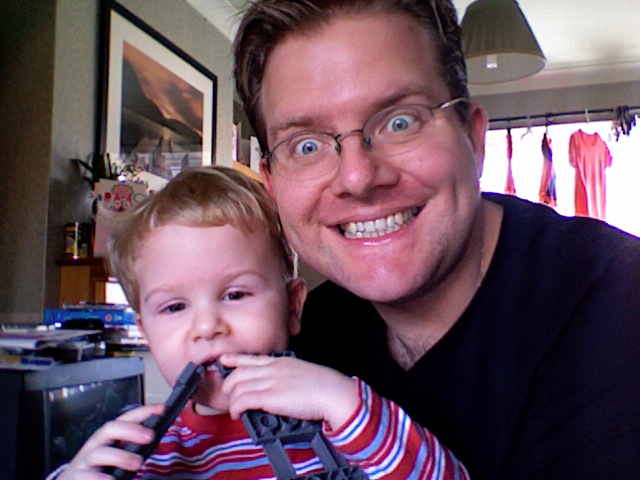
The kinkyMachine is back! Yes, I've got a brand new MacBook, and I'm gonna use it (for good and possibly for naughty, but probably not for evil. That'd be wrong.)
It's soooooo cool! I mean, my old iBook (500MHz Power PC) was about 6 years old, and compared to that, this new MacBook (2.2 GHz Core 2 Duo) is like hot poo! Everything's so quick, from something simple like System Preferences, to the speed it took to import umpteen thousand photos into iPhoto (which is so much better than the older version I was using).
And the built-in Bluetooth actually works with my RAZR, so that's an added bonus.
Plus, I managed to set up a wireless network without even really trying. Still not sure how I did it...
Plus Photo Booth is a laff!
Saturday, 2 February 2008
Aargh!
Sorry everyone, but my iBook has finally died! I'm writing this at an Apple Store, so I've gotta be brief. If there are no more updates for a while, or you don't get emails from me then that's the reason. I'll try to be back ASAP!
Friday, 18 January 2008
Why can't things just work?
Time for a Dilbert-style "Gaaa!" I got a new mobile phone for Christmas - a Motorola V3 RAZR, mainly because my old Nokia was just embarrassing, a camera phone would come in handy every now and then and because I really wanted the theme to Battle of the Planets as my ringtone. So I thought, OK this phone looks good, it does MP3 ringtones, Bob's your uncle.
So I got the phone and thought, I'll just hook it up to my iBook with a USB cable, and transfer the files across. Nope. The phone is recognized as a USB device, but doesn't mount as a volume on the desktop. iSync sort of worked - it dumped a few random phone numbers on the phone with garbled names attached, but that wasn't too much of a problem, as my address book on my iBook is so out-of-date it's got Abraham Lincoln's IM name in it. The internet basically said that wasn't going to work, so I thought I should try the Bluetooth route.
I went to Argos and bought a cheapie Bluetooth-USB adaptor and plugged it in, thinking that that wouldn't work, but the little B logo appeared in the menu bar and the Bluetooth Set-up assistant did its thing. The iBook recognized the phone, the phone recognised the iBook, they paired up like Kylie and Jason, and everything seemed to be fine. And then I tried to send a file to the phone, but apparently the iBook was "Unable to Validate Device".
Bizarrely, I can send stuff from the phone to my iBook, but not the other way around...
No one on the internet seems to know the answer. I've even tried a program called Moto4Lin, which theoretically should allow access via a USB cable, but I keep getting a "phone is busy" error message (?).
And so the only way I can work out to get stuff onto my phone is by sticking it on the 'net and then using WAP to download it - at a cost.
And hence my "Gaaa!". But it's alright, 'cos my son Joseph has decided he'd like to eat my Bluetooth dongle...
So I got the phone and thought, I'll just hook it up to my iBook with a USB cable, and transfer the files across. Nope. The phone is recognized as a USB device, but doesn't mount as a volume on the desktop. iSync sort of worked - it dumped a few random phone numbers on the phone with garbled names attached, but that wasn't too much of a problem, as my address book on my iBook is so out-of-date it's got Abraham Lincoln's IM name in it. The internet basically said that wasn't going to work, so I thought I should try the Bluetooth route.
I went to Argos and bought a cheapie Bluetooth-USB adaptor and plugged it in, thinking that that wouldn't work, but the little B logo appeared in the menu bar and the Bluetooth Set-up assistant did its thing. The iBook recognized the phone, the phone recognised the iBook, they paired up like Kylie and Jason, and everything seemed to be fine. And then I tried to send a file to the phone, but apparently the iBook was "Unable to Validate Device".
Bizarrely, I can send stuff from the phone to my iBook, but not the other way around...
No one on the internet seems to know the answer. I've even tried a program called Moto4Lin, which theoretically should allow access via a USB cable, but I keep getting a "phone is busy" error message (?).
And so the only way I can work out to get stuff onto my phone is by sticking it on the 'net and then using WAP to download it - at a cost.
And hence my "Gaaa!". But it's alright, 'cos my son Joseph has decided he'd like to eat my Bluetooth dongle...
Subscribe to:
Posts (Atom)